

- Open a shift. Go to the Incubator section and create your first line. This marks the start of your working period.
- Create a line. Select a match, specify the stake deposit, set odds, add a broadcast link, and click “Create.”
- Open the line. While the line is active, users can place bets. You can stop or resume betting at any time.
- Follow the match. Adjust odds, increase the pledge if necessary, or extend betting time.
- Calculate the result. After the match ends, enter the score. The system automatically pays out winnings to players and credits your profit.
Incubator Interface and Line Management
Below is the main interface for working with lines. Here you create events, manage odds, track bets, and calculate results.
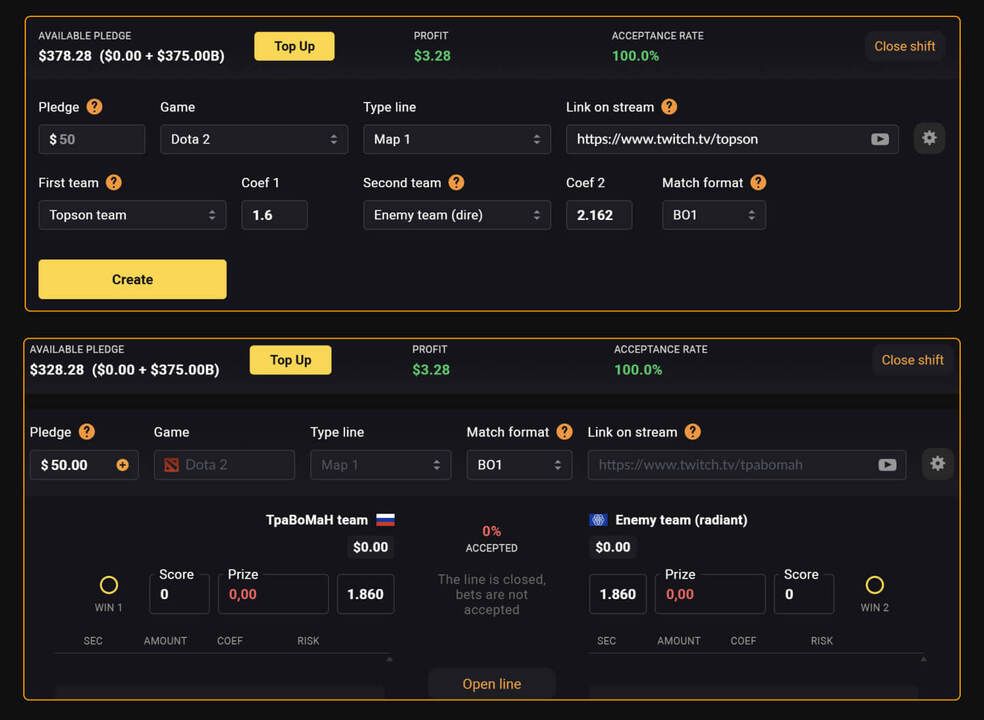
Line Management Features
These settings help control risks and odds behavior while bets are being placed.
- Odds sensitivity. Determines how strongly bets affect odds. The default is 1.5. At 0, odds do not change.
- Delay before accepting bets. A short delay (up to 15 seconds) that gives time to adjust odds or close the line.
- Limits and auto-closure. The maximum bet is 1/10 of the pledge. If potential payouts reach the pledge amount, the line closes automatically and reopens after it is increased.